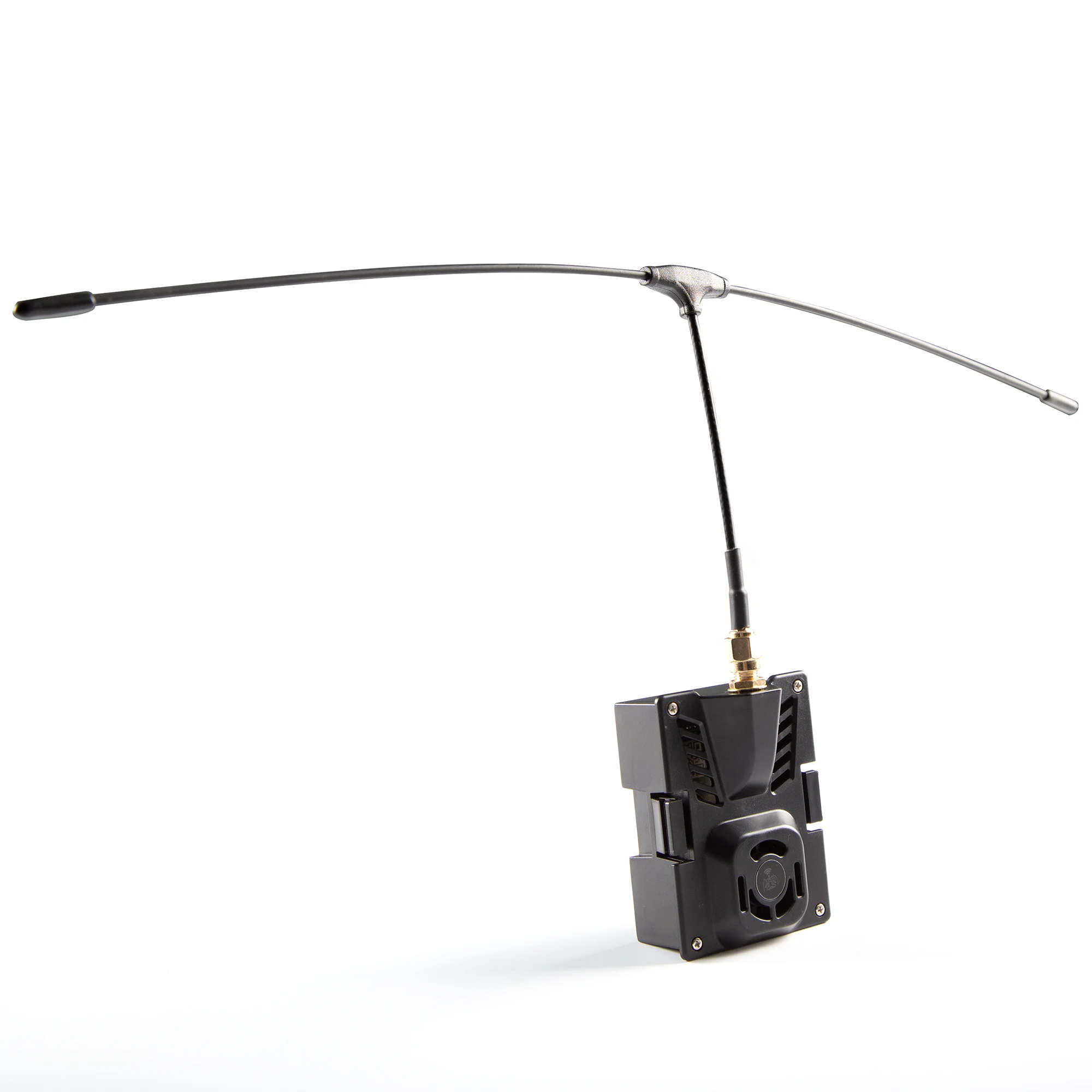
ELRS Nano 433 RX
Firmware Name: 433nano RX
Type: fcc
Antenna interface: IPEX1
Maximum refresh rate for reception: 500Hz
Minimum refresh rate for reception: 25Hz
Working voltage: 4-5.5V
Weight: 0.51 grams
Receiver size: 20mm * 11mm * 3mm
Work Agreement: CRSF(Betaflight)
Antenna size: 315mm * 97mm (there is a 1-3cm error in manual measurement)
Frequency steps:
1. Please first check the software version number of the ELRS high-end head or the built-in ELRS high-frequency head module. Currently, only the major version number 1. x.x is available
2. x.x, please confirm that the high-frequency head and receiver are of the same major version (if the high-frequency head of software version 2.0.1 and the receiver of software version 2.30 can be used for frequency matching normally, there is no need to upgrade the high-frequency head firmware). However, for better compatibility, it is recommended to upgrade the high-frequency head and receiver to the same software version
2. If the receiver quickly switches on and off three times, the LED will start flashing twice, indicating that the receiver has entered frequency matching mode. Enter high-frequency head Bind operation
After successful binding, the receiver The LED on the screen will become constantly on and can also receive telemetry signals.
4. Receiver LED status meaning: Constant light for successful frequency matching or normal communication connection, LED double flashing for frequency matching, LED slow flashing unable to receive transmitter signal, LED flash wifi communication mode. At this time, the program can be updated through computer or mobile phone connection
ELRS 433MHZ TX:
With the 2000mW Max RF Power, enjoy stronger signals, and longer transmission distances.
BelinRC ELRS-433-TX The high-frequency head is a new generation of remote control
wireless system developed based on the open-source project ExpressLRS. The ELRS system
has the characteristics of long remote control distance, stable connection, low latency,
high refresh rate, and flexible configuration.
1, Basic parameters
Frequency Band: (433MHz version/360-560Mhz optional)
Output power: 100mW/250mW/500mW/1000mW/(2000mW optional)
Refresh rate: 25Hz/50Hz/100Hz/200Hz
Input Voltage: 5-12V(2S)
Main control IC: ESP32+SX1278, backpack chip ESP8285
BelinRC ELRS-433-TX The high-frequency head can be used with all remote controls on
the market that use the JR interface. (Interface diagram):
2, Basic configuration
By default, the ELRS-433-TX high-frequency head only accepts signals from the Crossfire
Serial Data Protocol (CRSF). The high-frequency head interface of the remote control
needs to support CRSF signal output. The following takes the OpenTX remote control
system as an example to illustrate how to configure the remote control to output CRSF
signals and use the LUA script to control the ELRS high-frequency head.
3, CRSF protocol
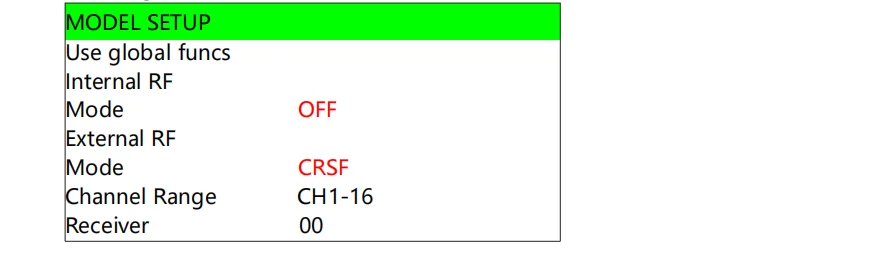
In OpenTX, select MODELSELECTION to enter the MODELSETUP page, where you can turn
Internal RF off (set to OFF), enable External RF, and set Output Mode to CRSF. This is shown
in the figure below.
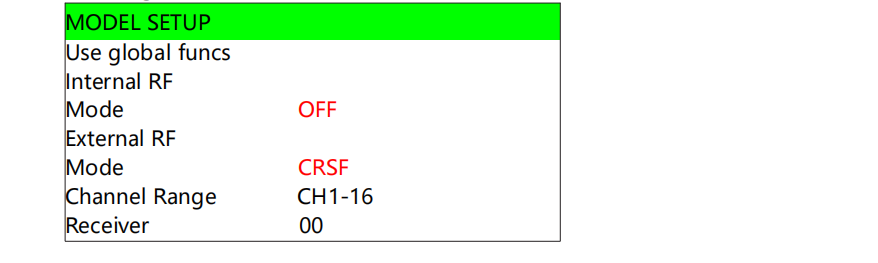
If the ELRS-433-TX high-frequency head is connected correctly, and the remote control is
configured as the CRSF output of the external high-frequency head (External RF) according
to the above, the ELRS high-frequency head can be used normally in principle.
4,LUA script manipulation
If you want to modify the power and refresh rate of the ELRS high-frequency head,
you need to use the LUA script of the OpenTX system. It is shown below.
Copy the official LUA script ELRS.lua to the SD card of the remote control, the path is
Scripts/Tools;
On the OpenTX system, press and hold the SYS button (e.g., RadioMaster T8 remote
controller, etc.) or the MENU button (e.g., Frsky Taranis X9D remote controller, etc.) to
enter the SD-HC CARD interface, select the ELRS.lua script and run the script on the
interface
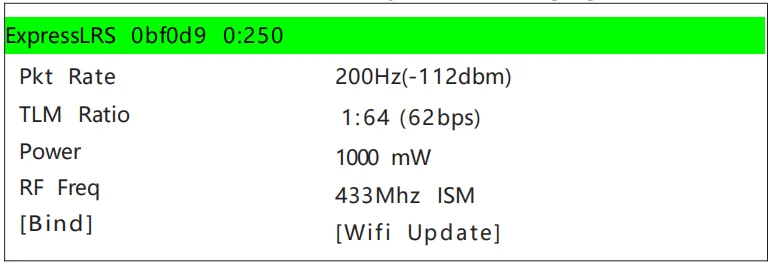
If the LUA script runs successfully, the following figure shows the page.
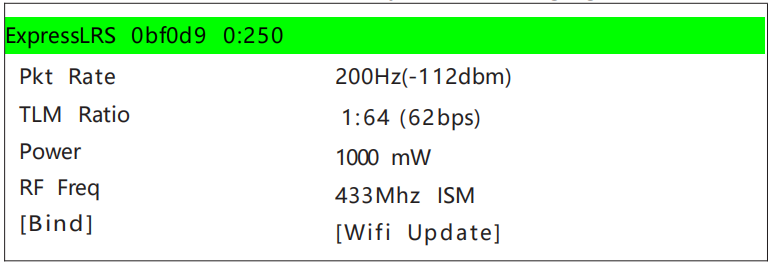
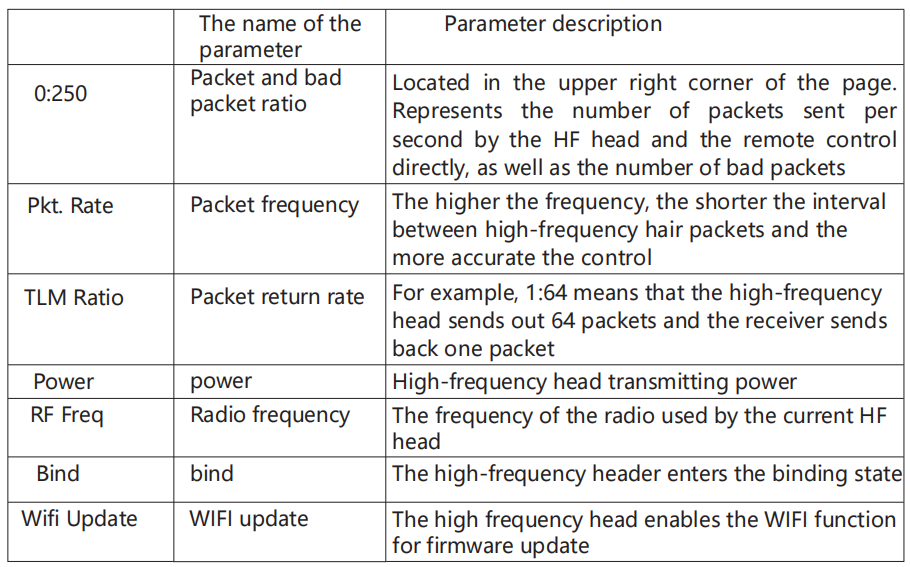
Using the LUA script, you can choose to configure parameters such as Rate, Ratio, and
Power. The following table describes all LUA script features.
Note: The official LUA script ELRS.lua can be downloaded from the ELRS support website
(see More Information section at the URL).
5, Alignment
The factory firmware of the ELRS high-frequency head uses the ExpressLRSV3.5.0 official
version of the protocol, and there is no binding phrase set. Therefore, the linking receiver
must also be V3.0.0~V3.5.0, and the linking password has not been set.
The ELRS high frequency head enters the matching state. Use the LUA script and select
Bind. The ELRS high frequency head enters the matching state. See the "LUA Script
Manipulation" section for details.